

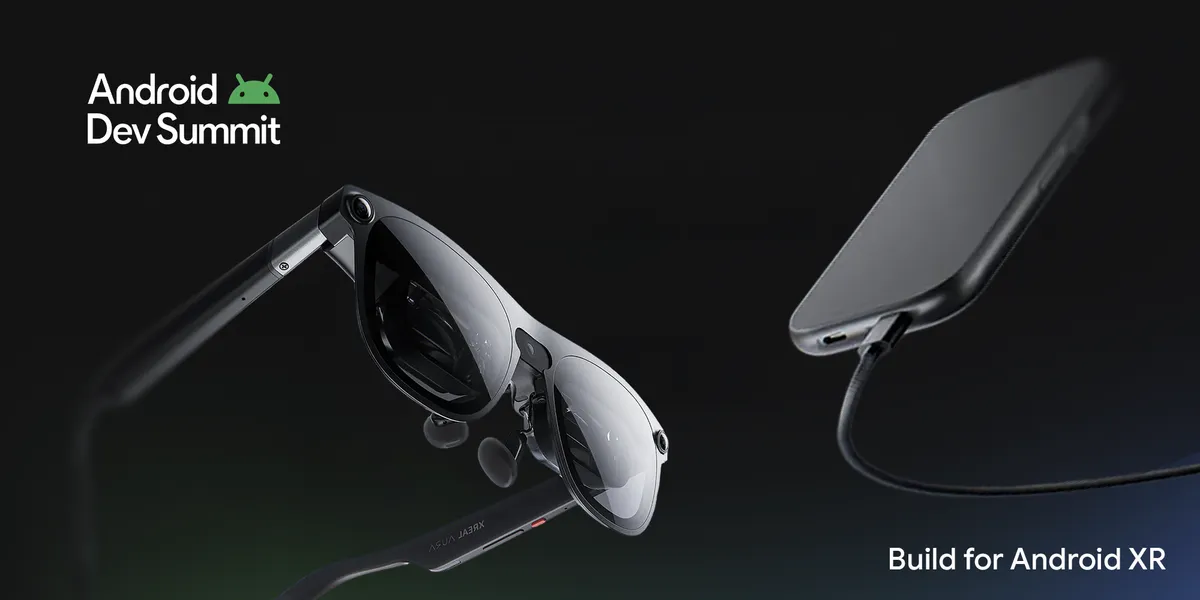
Launch of XREAL AURA Marks a New Era in XR Development
The Android Developer Summit recently celebrated a pivotal moment with the introduction of XREAL AURA, the inaugural wired XR glasses powered by Android XR. Weighing in at less than 95 grams and featuring a portable compute puck, XREAL AURA offers lightweight comfort while maintaining compatibility with existing applications, ensuring a seamless transition for developers looking to enhance spatial interactions.
To aid developers in navigating this evolving hardware landscape, we are providing a range of production-grade tools across the entire platform stack. Key updates include the stabilization of core Jetpack XR libraries and device emulators, the introduction of real-world anchoring in ARCore for Jetpack XR, and optimized workflows across popular 3D engines such as Unity, Godot, and Unreal Engine.
For a deeper insight into our announcements, please visit the Android Developer Summit XR Session Playlist to access all technical walkthroughs on demand.
Stabilizing Core Jetpack XR Foundations and Developer Tooling
For developers focusing on native experiences using Kotlin and Compose, achieving production readiness begins at the platform level. The core Jetpack XR SDK libraries have reached a stable release, ensuring API stability and reliable performance. This release features Jetpack SceneCore for crafting and managing 3D content, ARCore for Jetpack XR for environmental perception, and XR Runtime for standardized session management. Additionally, the Android XR emulators in Android Studio are now stable, allowing developers to build and visually test layouts across XR devices directly from their laptops.
For real-world application insights, watch Moving Beyond 2D with Custom 3D Geometry in the Jetpack XR SDK. This resource demonstrates techniques for animating glTF models, manipulating subnodes, using custom PBR materials at runtime, and generating real-time procedural 3D meshes in Kotlin with Jetpack SceneCore.
Anchoring Digital Experiences to the Physical World
The Geospatial APIs integrated into ARCore for Jetpack XR have reached stability, enabling precise anchoring of digital content to real-world coordinates with reliable local tracking. These capabilities facilitate contextual, location-aware experiences across wired XR glasses, merging visual positioning services with local device perception.
In the session titled Build World Anchored Experiences for XREAL AURA Wired XR Glasses, developers will learn to create glanceable optical see-through user interfaces using Jetpack Compose Glimmer, anchoring these designs to real-world locations. For teams utilizing game engines, Architecting Spatial Content on Android XR with Unity delves into mapping physical spaces, preserving 3D placements, and synchronizing shared multi-user experiences through Spatial Entities, Cloud Anchors, and ARCore Geospatial APIs.
Scaling Across Familiar 3D Engines
Android XR is designed to accommodate developers in established real-time environments. The Android XR Engine Hub has attained stability, streamlining setup, configuration, and optimization processes across Unity, Godot, and Unreal Engine. It simplifies project scaffolding with pre-defined OpenXR extensions and validated project settings, empowering rapid creation. The hub also offers native profiling workflows to help monitor system traces, thermal limits, and frame budgets on both CPU and GPU cores directly within the engine’s interface.
For an insight into how these systems interact directly with Android UI, view Elevate Immersive Experiences with 3D Engines in Jetpack Compose for XR. This session illustrates how to incorporate Godot and Unity as library components inside native Jetpack Compose applications using OpenXR Spatial Containers.
With familiar engine support, adapting existing 3D titles for Android XR form factors is more straightforward. Teams like Contract XR are harnessing this pipeline with their Unity game, Jigsaw Night, on XREAL AURA. This game enables a collaborative environment where players can move around, pass pieces, and solve puzzles together, showcasing how lightweight XR glasses and optimized engine workflows facilitate natural, multi-user mixed reality experiences.
Designing Multimodal Interactions with On-Device Audio
As the range of devices expands to include audio interactions, new tools are being introduced to facilitate lightweight, multimodal experiences. Developers can utilize the ML Kit Gen AI Text to Speech API to produce realistic-sounding voices enabled by on-device AI. New design guidelines, including Earcons, provide best practices for navigating audio-first and augmented settings. To see these tools in action, watch Building Audio-First Experiences for Intelligent Eyewear with Gemini Nano 4, which details how to integrate Jetpack Projected, ML Kit, and on-device Gemini Nano into hands-free, conversational applications.
Get Started with the Latest Tools
With the recent updates to our SDKs, emulators, and engine tools, developers now have the essential resources needed to create immersive and augmented experiences throughout the Android XR ecosystem. Ensure you update to the latest stable release of Android Studio to set up and test Android XR virtual devices for glasses, include the stable Jetpack XR dependencies in your build files, or install the Android XR Engine Hub plugin tailored for your preferred 3D engine. With the arrival of new devices such as XREAL AURA, now is the ideal moment to start building for Android XR. Visit our Android XR Developer Site for stable libraries, tools, and guides to kickstart your projects.
To explore all technical sessions and in-depth discussions from the Android Developer Summit, please check out the complete Android XR Session Playlist.

Chief Editor of Quincy City Beat — Quincy, MA's independent investigative newspaper covering Greater Boston and the entire Commonwealth of Massachusetts with fearless public accountability and free access for all readers.








Discussion about this post